Claude plugins give small businesses ready-made AI workflows for customer support, marketing, productivity, product management, and sales. Start with the plugin that solves your biggest daily challenge, connect only the tools you need, and review important actions before they happen.
An Extra Team Member Without Another Salary
Running a small business often means doing several jobs at once. You answer customer messages in the morning, prepare marketing content before lunch, follow up on unfinished tasks in the afternoon, and try to find time to improve your products or services at the end of the day.
The problem is not necessarily a lack of effort or experience. It is that one person has limited time and cannot manage every business function efficiently.
This is where Claude plugins can help.
Instead of using Claude only as a chatbot, you can equip it with specialized workflows designed for different business functions. These plugins help Claude understand the type of work you need, follow a structured process, and produce more relevant results.
They do not replace employees or business owners. They help reduce repetitive work, organize information, and make everyday tasks easier to manage.
In this article, we will explore five useful Claude plugins from Anthropic, what each one can do for a small business, and how to install them.
What Are Claude Plugins?
A Claude plugin is a package that adds specialized capabilities and workflows to Claude for a particular role or business function.
Depending on the plugin, it can include:
- Skills: Instructions and workflows that help Claude complete specific tasks.
- Connectors: Integrations that allow Claude to work with supported external services and business tools.
- Commands: Shortcuts for launching specific workflows.
- Sub-agents and hooks: Additional capabilities used in supported environments such as Cowork and Claude Code.
For example, without a specialized workflow, you might ask Claude to help you respond to a customer complaint and explain your support policy, communication style, and escalation process every time.
With a Customer Support plugin, Claude has predefined workflows for organizing support requests, preparing responses, and handling escalations.
Some plugins also support connections to tools such as Slack, Notion, project management platforms, and CRM systems. When the required connectors are configured and authorized, Claude can work with relevant business information instead of relying entirely on manually copied text.
The important distinction: Plugins provide the workflow and capabilities, while connectors provide access to external tools and information. Not every plugin requires an external connection.
Five Claude Plugins for Small Businesses
Here are five plugins that cover common responsibilities in a small business, from customer communication to product development.
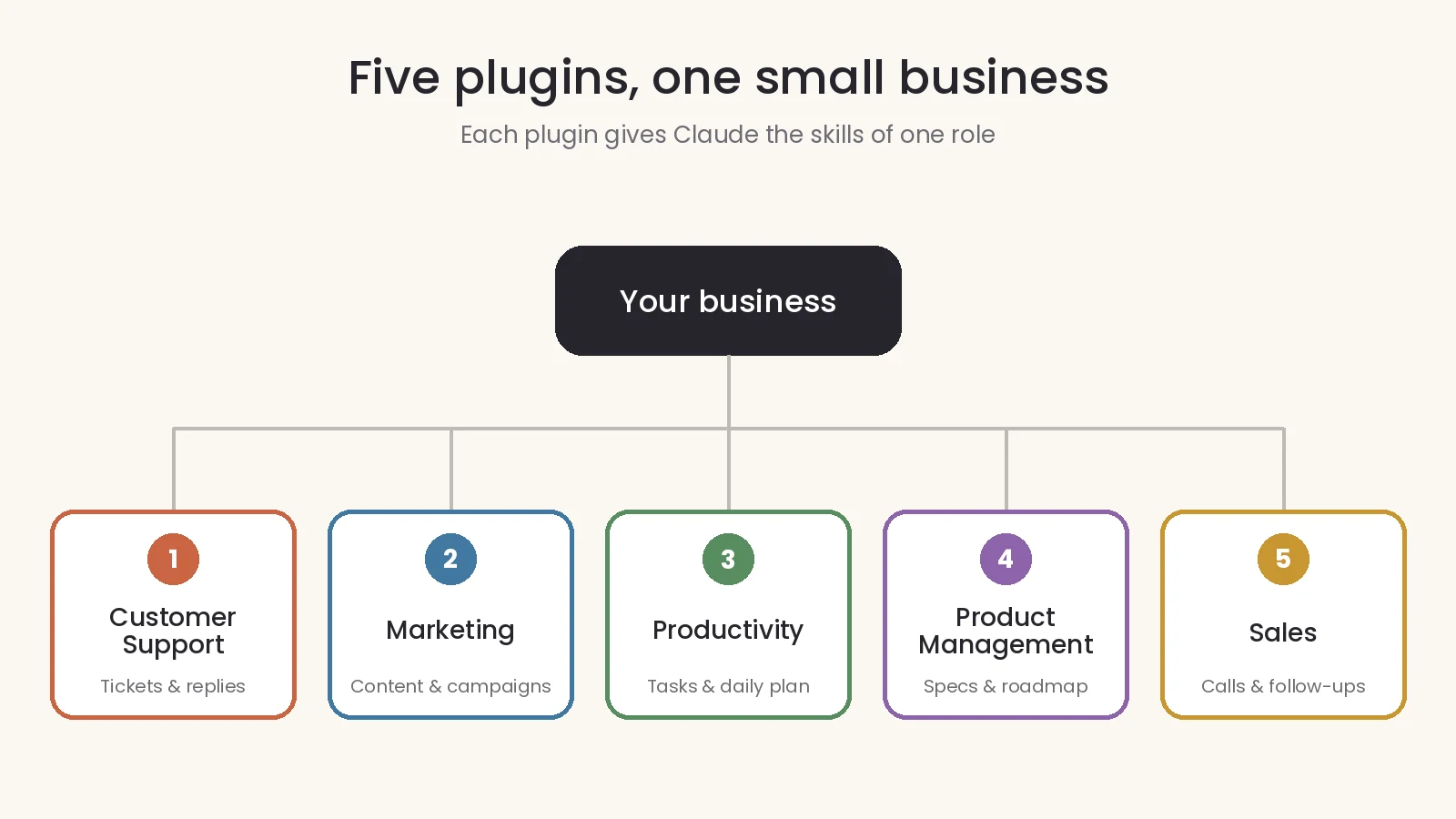
1. Customer Support
What it does:
The Customer Support plugin helps organize and manage customer service activities.
It can help you:
- Categorize incoming support requests.
- Prioritize customer complaints and urgent issues.
- Draft customer responses.
- Prepare summaries for escalated cases.
- Turn resolved problems into knowledge base articles.
Example from a normal workday:
A customer sends an angry message because their order has been delayed.
Instead of spending 15 minutes reviewing the situation and writing a response from scratch, Claude can organize the available information, prepare a polite reply, and summarize the issue if it needs further attention.
You review the response before sending it.
2. Marketing
What it does:
The Marketing plugin helps organize marketing activities and create content across different channels.
It can help you:
- Prepare marketing content and campaign plans.
- Develop email marketing sequences.
- Maintain a consistent brand voice.
- Research competitors.
- Summarize marketing performance and identify useful insights.
Example from a normal workday:
You are preparing a promotional campaign for the end of the month.
Claude can help you build a two-week campaign plan, including content ideas, email messages, and a publishing schedule.
You can then review the plan and adjust it to match your products, audience, and available budget.
3. Productivity
What it does:
The Productivity plugin helps organize personal and team workflows.
It can help you:
- Manage and prioritize tasks.
- Plan your daily schedule.
- Organize information about clients and projects.
- Keep important work context accessible.
- Coordinate tasks across supported productivity tools.
Example from a normal workday:
You start your morning with several unfinished tasks, customer follow-ups, and upcoming meetings.
Instead of reviewing multiple applications manually, you can ask Claude to help organize your priorities and prepare a clear list of what needs attention.
With the appropriate integrations, it can also use information from your calendar, email, and task management tools.
4. Product Management
What it does:
The Product Management plugin helps businesses organize product development and improvement.
It can help you:
- Write feature specifications.
- Organize and update product roadmaps.
- Summarize customer feedback.
- Identify recurring product issues.
- Prepare project and stakeholder updates.
- Research competitors and market developments.
Example from a normal workday:
You have collected 40 comments from customers about your product.
Claude can group similar feedback, identify recurring problems, and help turn those comments into five clear improvement priorities.
You still decide which improvements should be implemented first.
5. Sales
What it does:
The Sales plugin helps organize sales activities and prepare for customer conversations.
It can help you:
- Research potential customers.
- Prepare for sales calls and meetings.
- Summarize conversations.
- Draft outreach and follow-up messages.
- Review open opportunities and sales pipelines.
- Prepare sales forecasts using available information.
Example from a normal workday:
You have a meeting scheduled with a potential customer.
Claude can help prepare a short company profile, summarize available information about the prospect, and suggest questions to ask during the meeting.
This allows you to spend less time researching manually and more time preparing for the actual conversation.
Which Plugin Should You Install First?
You do not need all five plugins. The right choice depends on your business model and the tasks that consume most of your time.
Here is a practical starting point:
| Your business situation | Recommended plugin |
|---|---|
| Small online store | Marketing + Customer Support |
| Freelancer managing several clients | Productivity |
| Business developing a new product or application | Product Management |
| Business focused on finding new customers | Sales |
| Business receiving many customer complaints | Customer Support |
If you work alone, Productivity may be the best starting point because it helps organize several areas of your daily work.
If you run an online store, Marketing and Customer Support are often more immediately useful.
Start with one plugin, use it on real tasks, and evaluate the results before installing more.
How to Install Claude Plugins
Installing a plugin through Claude's interface does not require programming knowledge.
Plugins are available on paid Claude plans, including Pro, Max, Ultra, Team, and Enterprise. They are not included in the Free plan.
The installation process is straightforward:
- Open Claude on the web or in the desktop application.
- Select Customize from the left sidebar.
- Open the Plugins tab.
- Select Discover to browse available plugins.
- Choose the plugin you need and click Add.
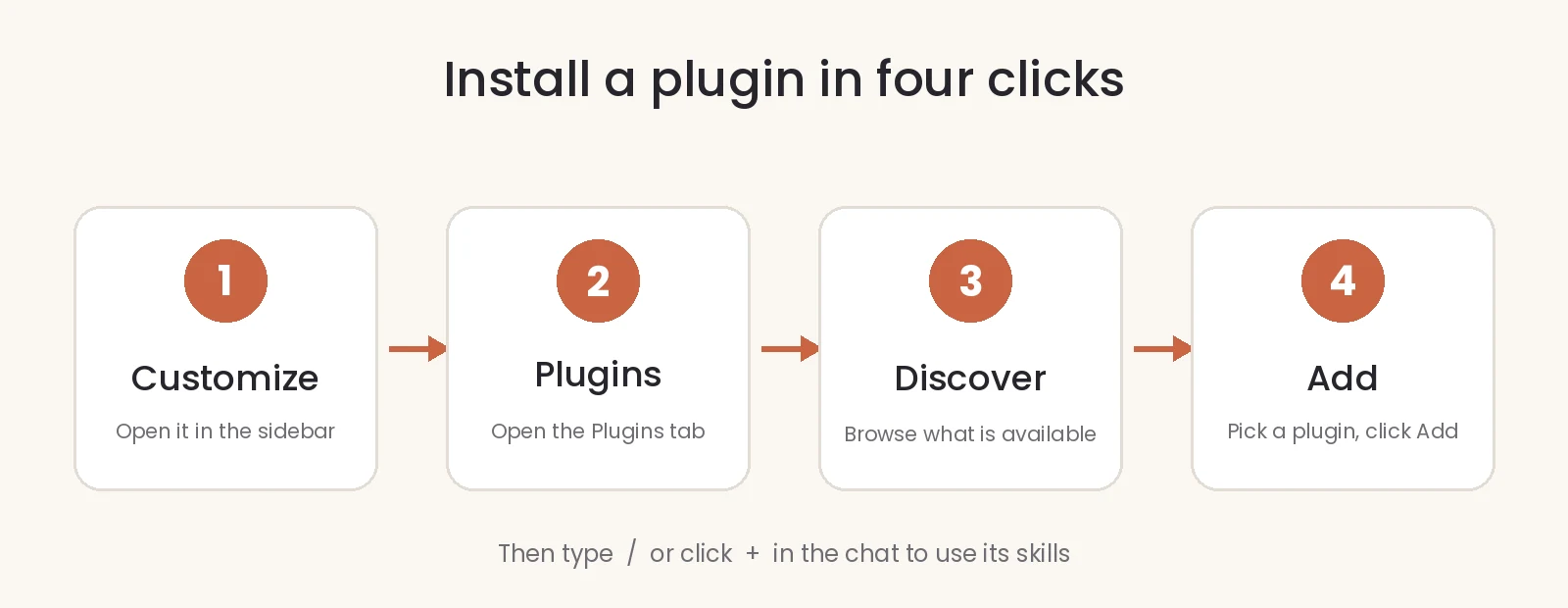
After installation, you can access its skills by typing / in the conversation box or clicking the + button.
You can also describe the task in your own words, and Claude can use a relevant installed skill when appropriate.
Installing Plugins in Claude Code
If you use Claude Code, you can install plugins through the terminal.
First, add the official Knowledge Work plugin marketplace:
claude plugin marketplace add anthropics/knowledge-work-pluginsThen install the plugin you need. For example:
claude plugin install marketing@knowledge-work-pluginsYou can replace marketing with another plugin name:
customer-supportproductivityproduct-managementsales
These commands install plugins from Anthropic's official Knowledge Work marketplace.
Important Security Considerations
Plugins can make your workflows more powerful, but they may also interact with business information and external systems.
Before installing or connecting a plugin:
- Choose trusted sources: Start with Anthropic's official plugins and verified marketplace listings.
- Review permissions: Understand which services and information the plugin can access.
- Limit access: Give integrations only the permissions they actually need.
- Protect customer information: Avoid exposing sensitive data unnecessarily.
- Review important actions: Check customer messages, financial operations, and changes to business records before approving them.
Some plugins may include local MCP servers that run with the same permissions as other programs on your computer. Only install plugins from sources you trust.
Three Tips Before You Start
Getting useful results from Claude plugins requires more than installing them. How you use them matters.
1. Start with One Plugin
Choose the plugin that addresses your biggest daily challenge.
Use it for a week on actual business tasks. Measure whether it saves time, improves the quality of your work, or makes your workflow easier.
2. Give Claude Your Business Context
Claude produces more relevant results when it understands your business.
Provide useful information such as:
- Your business model and main products or services.
- Your target audience and customer expectations.
- Your preferred communication and writing style.
- Your customer service and refund policies.
- Your business priorities and current projects.
Avoid sharing passwords or unnecessary confidential information.
3. Review Before Taking Action
A plugin can prepare a response, organize information, or recommend an action, but you remain responsible for the final result.
Always review important customer communications, financial actions, and business decisions before they are executed.
Conclusion
Small businesses do not always have the resources to employ a separate team for marketing, customer support, sales, and product management.
Claude plugins offer a practical way to bring specialized AI workflows into everyday business operations without building everything from scratch.
Start with the task that takes most of your time, choose the plugin designed for that function, and gradually expand as you identify real opportunities to improve your workflow.
Technology should make running a business easier, not create another system that needs constant attention.
If you need help organizing daily operations, improving workflows, or identifying tasks that can be simplified through AI and automation, explore my Business Operations & Management Support services.